Wednesday, 6 February 2019

PHP Environment in Linux

Reference: 
Install Mosh under Linux:
apt-get install mosh
To connect to the remote server:
mosh --ssh="ssh -i ubun-exp_steven.pem -p 22" ubuntu@54.69.70.40
mosh --ssh="ssh -i ~/.ssh/id_rsa -p 22" steven@54.69.70.40
Create a new user:
useradd -m -s /bin/bash -c 'git user' steven
Add user to sudo (admin) group:
usermod -aG sudo steven
id steven
Set up basic environment:
git clone https://github.com/junxie6/config_centos_v2.git
bash config_centos_v2/script/setHomeConfig.sh
exit

AWS EC2 Machine

Remote access with key pairs
First step: 
Local machine generate public key: 
test -f ~/.ssh/id_rsa.pub && cat ~/.ssh/id_rsa.pub || 
ssh-keygen -t rsa -C "my@example.com" && cat ~/.ssh/id_rsa.pub
Save key without any formatting
Second step:
Create a new account and add the newly created account to the sudo(admin) group:
- useradd user_name -m -s /bin/bash -c 'admin user' && usermod -aG sudo user_name
Let users who are in sudo group no need to enter password when switching to root:
visudo
%sudo ALL=(ALL:ALL) NOPASSWD: ALL
Then, shift user to new user
# sudo su - user_name
Last step: put local public key to remote’s account:
steven2@remote $ mkdir ~/.ssh \
&& chmod 700 ~/.ssh \
&& touch ~/.ssh/authorized_keys \
&& chmod 600 ~/.ssh/authorized_keys \
&& vim ~/.ssh/authorized_keys
ctrl+ins command to paste the public key from local machine
esc + : + w
esc + : + q
Then, locally start connection: 
mosh user_name@public_dns

C++ Class Examples

二进制文件读写:下面的程序从键盘输入几个学生的姓名和成绩,并以二进制文件形式存起来
#include <iostream>
#include <fstream>
#include <cstring>
using namespace std;
class CStudent {
public:
 char szName[20];
 int nScore;
};
int main() {
 CStudent s;
 ofstream OutFile("c:\\tmp\\students.dat", ios::out | ios::binary);
 while (cin >> s.szName >> s.nScore) {
  if (strcmp(s.szName, "exit") == 0)
   break;
  OutFile.write((char*)&s, sizeof(s));
 }
 OutFile.close();
 return 0;
}
二进制文件读写:下面的程序将students.dat文件的内容读出并显示
#include <iostream>
#include <fstream>
using namespace std;
class CStudent {
public:
 char szName[20];
 int nScore;
};
int main() {
 CStudent s;
 ifstream inFile("C:\\Users\kang3\Desktop\students.dat", ios::in | ios::binary);
 if (!inFile) {
  cout << "error" << endl;
  return 0;
 }
 while (inFile.read((char*)&s, sizeof(s))) {
  int nReadedBytes = inFile.gcount();//看刚才读了多少字节
  cout << s.szName << " " << s.nScore << endl;
 }
 inFile.close();
 return 0;
}
二进制文件读写:下面的程序将 students.dat 文件的Jane的名字改成Mike
#include <iostream>
#include <fstream>
using namespace std;
class CStudent {
public:
 char szName[20];
 int nScore;
};
int main() {
 CStudent s;
 fstream iofile("D:\tmp\students.dat", ios::in|ios::out | ios::binary);
 if (!iofile) {
  cout << "error";
  return 0;
 }
 iofile.seekp(2 * sizeof(s), ios::beg);//定位写指针到第三个记录
 iofile.write("Mike", strlen("Mike") + 1);
 iofile.seekg(0, ios::beg); //定位读指针到开头
 while (iofile.read((char*)&s, sizeof(s)))
  cout << s.szName << " " << s.nScore << endl;
 iofile.close();
 return 0;
}
例子:mycopy 程序,文件拷贝
//用发实例:
//mycopy src.dat dest.dat
//即将 src.dat 拷贝到 dest.dat
//如果 dest.dat 原来就有,则原来的文件会被覆盖
#include <iostream>
#include <fstream>
using namespace std;
int main(int argc, char* argv[]) {
 if (argc != 3) {
  cout << "File name missing!" << endl;
  return 0;
 }
 ifstream inFile(argv[1], ios::binary | ios::in);
 if (!inFile) {
  cout << "Source file open error." << endl;
  return 0;
 }
 ofstream outFile(argv[2], ios::binary | ios::out);
 if (!outFile) {
  cout << "New file open error." << endl;
  inFile.close();
  return 0;
 }
 char c;
 while (inFile.get(c))
  outFile.put(c);
 outFile.close();
 inFile.close();
 return 0;
}

C++ Function Template

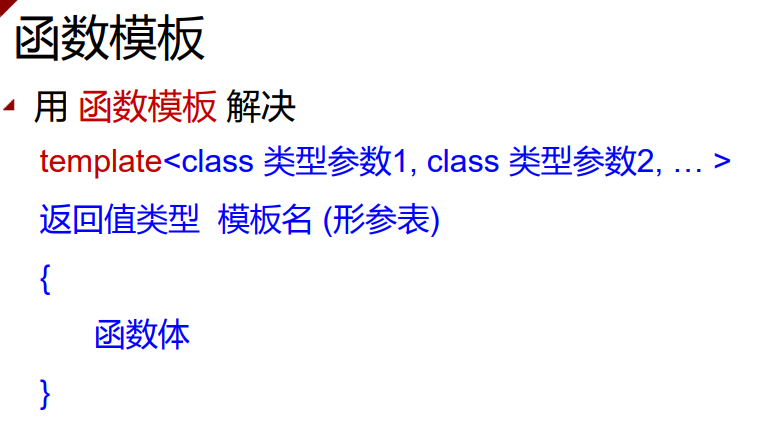
函数模板
泛型程序设计:Generic Programming
算法实现时不指定具体要操作的数据类型
泛型--算法实现一边->适用于多种数据结构
优势:减少重复代码的编写
大量编写模板,使用模板的程序设计:函数模板,类模板
交换两个变量值的函数模板:
template <class T>
void Swap(T&x, T&y) {
 T tmp = x;
 x = y;
 y = tmp;
}
int main() {
 int n = 1, m = 2;
 Swap(n, m);
 double f = 1.2, g = 2.3;
 Swap(f, g);
 return 0;
}
函数模板中可以有不止一个类型参数
template <class T1,class T2>
T2 print(T1 arg1, T2 arg2) {
 cout << arg1 << " " << arg2 << endl;
 return arg2;
}
函数模板可以重载,只要它们的形参表不用即可:
template <class T1,class T2>
void print(T1 arg1, T2 arg2)
{
 cout << arg1 << " " << arg2 << endl;
}
template<class T>
void print(T arg1, T arg2)
{
 cout << arg1 << " " << arg2 << endl;
}
C++编译器遵循一下优先顺序:
  1. 先找参数完全匹配的普通函数(非由模板实例化而得的函数)
  2. 再找参数完全匹配的模板函数
  3. 再找实参经过自动类型转换后能够匹配的普通函数
  4. 上面的都找不到,则报错
template <class T>
T Max(T a, T b)
{
 cout << "Template Max 1" << endl
  ;
 return 0;
}
template <class T, class T2>
T Max(T a, T2 b)
{
 cout << "Template Max 2" << endl
  ;
 return 0;
}
double Max(double a, double b) {
 cout << "MyMax" << endl;
 return 0;
}
int main()
{
 int i = 4, j = 5;
 Max(1.2, 3.4); //调用Max(double, double)函数
 Max(i, j); //调用第一个T Max(T a, T b)模板生成的函数
 Max(1.2, 3); //调用第二个T Max(T a, T2 b)模板生成的函数
 return 0;
}
为了避免函数的二义性:可以在函数模板中使用多个类型参数,可以避免二义性

C++ Class Template

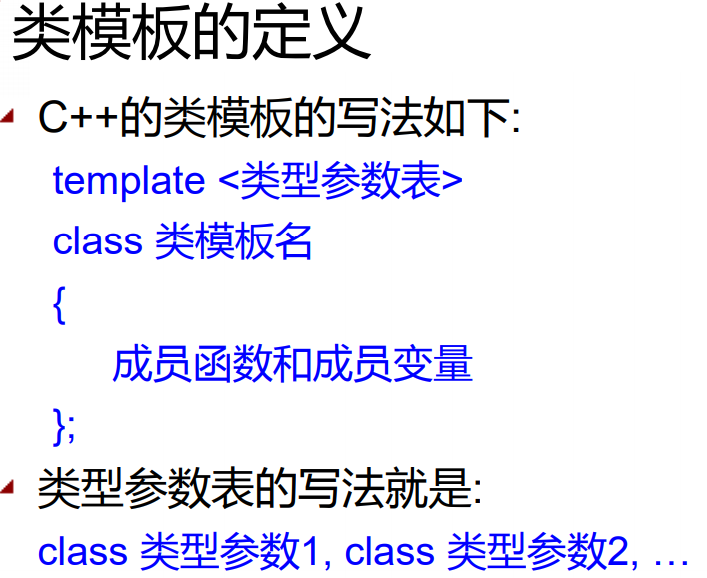
类模板

问题的提出:
对于这些数组:除了元素的类型不同之外,其他的完全相同
在调用类模板时, 指定参数, 由编译系统根据参数提供 的数据类型自动产生相应的模板类
template<class T1,class T2>
class Pair {
public:
 T1 key;
 T2 value;
 Pair(T1 k, T2 v) :key(k), value(v) {};
 bool operator<(const Pair<T1, T2>&p)const;
};
template<class T1,class T2>
bool Pair<T1, T2>::operator<(const Pair<T1, T2>&p)const {
 return key < p.key;
}
int main() {
 Pair<string, int>student("Tom", 19);
 cout << student.key << " " << student.value;
 return 0;
}
同一个类模板的两个模板类是不兼容的 
Pair * p;
Pair a; 
p = & a; //wrong
类模板与继承:
  1. 类模板从类模板派生:
template<class T1,class T2>
class A {
 T1 v1; T2 v2;
};
template<class T1, class T2>
class B :public A<T2, T1> {
 T1 v3; T2 v4;
};
template<class T>
class C :public B<T, T> {
 T v5;
};
int main() {
 B<int, double> obj1;
 C<int> obj2;
 return 0;
}
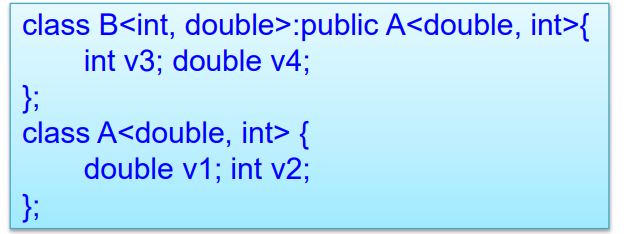
2. 类模板从模板类派生:
template<class T1,class T2>
class A {
 T1 v1; T2 v2;
};
template<class T>
class B :public A<int, double> {
 T v;
};
int main() {
 B<char> obj1;
 return 0;
}
自动生成两个模板类:A<int,double>和B<char>
3. 类模板从普通类派生
class A { int v1; };
template <class T>
class B :public A { T v; };
int main() {
 B<char> obj1;
 return 0;
}
4. 普通类从模板类派生:
template <class T>
class A { T v1; int n; };
class B:public A<int> { double v; };
int main() {
 B obj1;
 return 0;
}

Linux Command Cheat Sheet

Cheat Sheet
Below is a Cheat Sheet of Linux commands we have learned in this tutorial
Command
Description
ls
Lists all files and directories in the present working directory
ls - R
Lists files in sub-directories as well
ls - a
Lists hidden files as well
ls - al
Lists files and directories with detailed information like permissions, size, owner, etc.
cat > filename
Creates a new file
cat filename
Displays the file content
cat file file2 > file3
Joins two files (file1, file2) and stores the output in a new file (file3)
mv file "new file path"
Moves the files to the new location
mv filename new_file_name
Renames the file to a new filename

HTML&CSS

Self-Closing Elements:
<br>, <embed>, <hr>, <img>, <input>, <link>, <meta>, <param>, <source>, <wbr>
CSS selectors: type, class, and ID
  1. Type Selectors: target all division elements <div>
CSS:
div{...}
HTML:
<div>...</div>
<div>...</div>
2. Class Selector: select a particular group of elements rather than all elements of one type
CSS:
.awesome{...}
HTML:
<div class="awesome">...</div>
<p class="awesome">...</p>
3. ID Selector: target only one unique element at a time
CSS:
#name{...}
HTML:
<div id="name">...</div>
<div> and <span> exist for styling only.
<div>is used to identify large grouping of content
<span>used to identify smaller groupings of text within a block-level element.

Tuesday, 29 January 2019

PHP HTML Form

PHP String Operators:
OperatorDescriptionExampleResult
.Concatenation$str1 . $str2Concatenation of $str1 and $str2
.=Concatenation assignment$str1 .= $str2Appends the $str2 to the $str1

<?php $x = "Hello"; $y = " World!"; echo $x . $y; // Outputs: Hello World! $x .= $y; echo $x; // Outputs: Hello World! ?>

PHP Array Operators

The array operators are used to compare arrays:
OperatorNameExampleResult
+Union$x + $yUnion of $x and $y
==Equality$x == $yTrue if $x and $y have the same key/value pairs
===Identity$x === $yTrue if $x and $y have the same key/value pairs in the same order and of the same types
!=Inequality$x != $yTrue if $x is not equal to $y
<>Inequality$x <> $yTrue if $x is not equal to $y
!==Non-identity$x !== $yTrue if $x is not identical to $y
<?php echo ($age < 18) ? 'Child' : 'Adult'; ?>
<?php $name = isset($_GET['name']) ? $_GET['name'] : 'anonymous'; ?>

PHP Functions for Sorting Arrays:

  • sort() and rsort() — For sorting indexed arrays
  • asort() and arsort() — For sorting associative arrays by value
  • ksort() and krsort() — For sorting associative arrays by key
Round a Fractional Value up or down
ceil(): round a fractional value up;
floor(); round a fractional value down;
rand(); generate some random numbers; //rand(1,10)

PHP Get and Post:
<!DOCTYPE html> <html lang="en"> <head> <title>Example of PHP GET method</title> </head> <body> <?php if(isset($_GET["name"])){ echo "<p>Hi, " . $_GET["name"] . "</p>"; } ?> <form method="get" action="<?php echo $_SERVER["PHP_SELF"];?>"> <label for="inputName">Name:</label> <input type="text" name="name" id="inputName"> <input type="submit" value="Submit"> </form> </body>

Note: $_SERVER["PHP_SELF"] call the php inside this URL;


Running PHP code on Terminal window:
sudo php -f filename.php

Login mysql: mysql -u root -p

Rename file in Linux: sudo mv original_filename new_filename


Thursday, 24 January 2019

PHP MySQL Login System

PHP MySQL Login System

Building the register system:
Step1: creating the database table
CREATE TABLE users ( id INT NOT NULL PRIMARY KEY AUTO_INCREMENT, username VARCHAR(50) NOT NULL UNIQUE, password VARCHAR(255) NOT NULL, created_at DATETIME DEFAULT CURRENT_TIMESTAMP );

INT: Stores numeric values in the range of -2147483648 to 2147483647
NOT NULL: constraint the field cannot accept a NULL value.
PRIMARY KEY: constraint; marks the corresponding field as the table's primary key.
AUTO_INCREMENT: a MySQL extension to standard SQL, which tells MySQL to automatically assign a value to this field if it is left unspecified, by incrementing the previous value by 1. Only available for numeric field.
VARCHAR():Stores variable-length strings with a maximum size of 65,535 characters.
N:CHAR():Stores fixed-length strings with a maximum size of 255 characters.
UNIQUE: ensures that each row for a column must have a unique value.
DATETIME: Stores combined date/time values in the YYYY-MM-DD HH:MM:SS format.
CURRENT_TIMESTAMP: Stores timestamp values. TIMESTAMP values are stored as the number of seconds since the Unix epoch ('1970-01-01 00:00:01' UTC).


Create the Config File to connect the MySQL database server.

<?php /* Database credentials. Assuming you are running MySQL server with default setting (user 'root' with no password) */ define('DB_SERVER', 'localhost'); define('DB_USERNAME', 'root'); define('DB_PASSWORD', '123456'); define('DB_NAME', 'demodb'); /* Attempt to connect to MySQL database */ $link = mysqli_connect(DB_SERVER, DB_USERNAME, DB_PASSWORD, DB_NAME); // Check connection if($link === false){ die("ERROR: Could not connect. " . mysqli_connect_error()); } ?>

Create the Registration Form.
<?php // Include config file require_once "config.php"; // Define variables and initialize with empty values $username = $password = $confirm_password = ""; $username_err = $password_err = $confirm_password_err = ""; // Processing form data when form is submitted if($_SERVER["REQUEST_METHOD"] == "POST"){ // Validate username if(empty(trim($_POST["username"]))){ $username_err = "Please enter a username."; } else{ // Prepare a select statement $sql = "SELECT id FROM users WHERE username = ?"; if($stmt = mysqli_prepare($link, $sql)){ // Bind variables to the prepared statement as parameters mysqli_stmt_bind_param($stmt, "s", $param_username); // Set parameters $param_username = trim($_POST["username"]); // Attempt to execute the prepared statement if(mysqli_stmt_execute($stmt)){ /* store result */ mysqli_stmt_store_result($stmt); if(mysqli_stmt_num_rows($stmt) == 1){ $username_err = "This username is already taken."; } else{ $username = trim($_POST["username"]); } } else{ echo "Oops! Something went wrong. Please try again later."; } } // Close statement mysqli_stmt_close($stmt); } // Validate password if(empty(trim($_POST["password"]))){ $password_err = "Please enter a password."; } elseif(strlen(trim($_POST["password"])) < 6){ $password_err = "Password must have atleast 6 characters."; } else{ $password = trim($_POST["password"]); } // Validate confirm password if(empty(trim($_POST["confirm_password"]))){ $confirm_password_err = "Please confirm password."; } else{ $confirm_password = trim($_POST["confirm_password"]); if(empty($password_err) && ($password != $confirm_password)){ $confirm_password_err = "Password did not match."; } } // Check input errors before inserting in database if(empty($username_err) && empty($password_err) && empty($confirm_password_err)){ // Prepare an insert statement $sql = "INSERT INTO users (username, password) VALUES (?, ?)"; if($stmt = mysqli_prepare($link, $sql)){ // Bind variables to the prepared statement as parameters mysqli_stmt_bind_param($stmt, "ss", $param_username, $param_password); // Set parameters $param_username = $username; $param_password = password_hash($password, PASSWORD_DEFAULT); // Creates a password hash // Attempt to execute the prepared statement if(mysqli_stmt_execute($stmt)){ // Redirect to login page header("location: login.php"); } else{ echo "Something went wrong. Please try again later."; } } // Close statement mysqli_stmt_close($stmt); } // Close connection mysqli_close($link); } ?> <!DOCTYPE html> <html lang="en"> <head> <meta charset="UTF-8"> <title>Sign Up</title> <link rel="stylesheet" href="https://maxcdn.bootstrapcdn.com/bootstrap/3.3.7/css/bootstrap.css"> <style type="text/css"> body{ font: 14px sans-serif; } .wrapper{ width: 350px; padding: 20px; } </style> </head> <body> <div class="wrapper"> <h2>Sign Up</h2> <p>Please fill this form to create an account.</p> <form action="<?php echo htmlspecialchars($_SERVER["PHP_SELF"]); ?>" method="post"> <div class="form-group <?php echo (!empty($username_err)) ? 'has-error' : ''; ?>"> <label>Username</label> <input type="text" name="username" class="form-control" value="<?php echo $username; ?>"> <span class="help-block"><?php echo $username_err; ?></span> </div> <div class="form-group <?php echo (!empty($password_err)) ? 'has-error' : ''; ?>"> <label>Password</label> <input type="password" name="password" class="form-control" value="<?php echo $password; ?>"> <span class="help-block"><?php echo $password_err; ?></span> </div> <div class="form-group <?php echo (!empty($confirm_password_err)) ? 'has-error' : ''; ?>"> <label>Confirm Password</label> <input type="password" name="confirm_password" class="form-control" value="<?php echo $confirm_password; ?>"> <span class="help-block"><?php echo $confirm_password_err; ?></span> </div> <div class="form-group"> <input type="submit" class="btn btn-primary" value="Submit"> <input type="reset" class="btn btn-default" value="Reset"> </div> <p>Already have an account? <a href="login.php">Login here</a>.</p> </form> </div> </body> </html>